garagevo

GV-01 Workshop software for car repair shops, from one person shops to multi bay services

Born in a workshop, not in an office.

Garagevo was designed by the owner of a car repair workshop who works in the workshop every day. That is why it has what you need, and nothing that only gets in the way.

Book a 15 minute demoSee it in action

30 days free, no card needed: the first week with every feature of the Pro package, then Basic until day 30. So you see on your own work which package you need.

Example, invented data.
  • Phone and computer
  • Nothing to install
  • Hosted in the EU
  • 11 languages

GV-02 Switching from the old program

No need to start over. All your data comes along.

Customers, cars, part numbers and the old work orders: we bring everything over from your old workshop program, free of charge. You send us the data, we take care of the rest.

I want to move over

  1. 01

    You send it

    Upload the old program's backup or export on Garagevo's Data import page. If you do not know where it is, we call you back and help.

  2. 02

    We convert it

    The old structure becomes Garagevo data. Nothing is thrown away, not even a faulty VIN.

  3. 03

    We load it

    Quickly, and we tell you how many customers, cars, parts and work orders came over.

  4. 04

    You work

    The old work orders show at the car, with their old number and amount.

  • Customers
  • Cars
  • Part numbers, article list
  • Old work orders and their lines
  • Odometer readings

The data goes to the EU data centre, under the data processing agreement; we delete the uploaded files after loading.

Your workshop, evolved.

Photograph the registration, make the work order, and follow the repair on the phone or the computer.

Every button and every step comes from everyday workshop work: how the car arrives, what the customer asks, and what the mechanic needs even with oily hands.

Garagevo is shaped by the experience of mechanics and workshop owners.

The smart violet button

Wherever Garagevo helps with artificial intelligence, this button is there. One tap, and the quick helper does most of the typing and searching.

  • Fills in the car and the customer from a photo of the registration.
  • Dictate the job, and it finds the matching articles in your stock.
  • The car's data sheet (oil, quantities, maintenance) with one tap.

Before every use it shows what it costs: free or how many credits. You approve what it finds.

Registration photofree

What counts in the workshop

A photo instead of typing AI

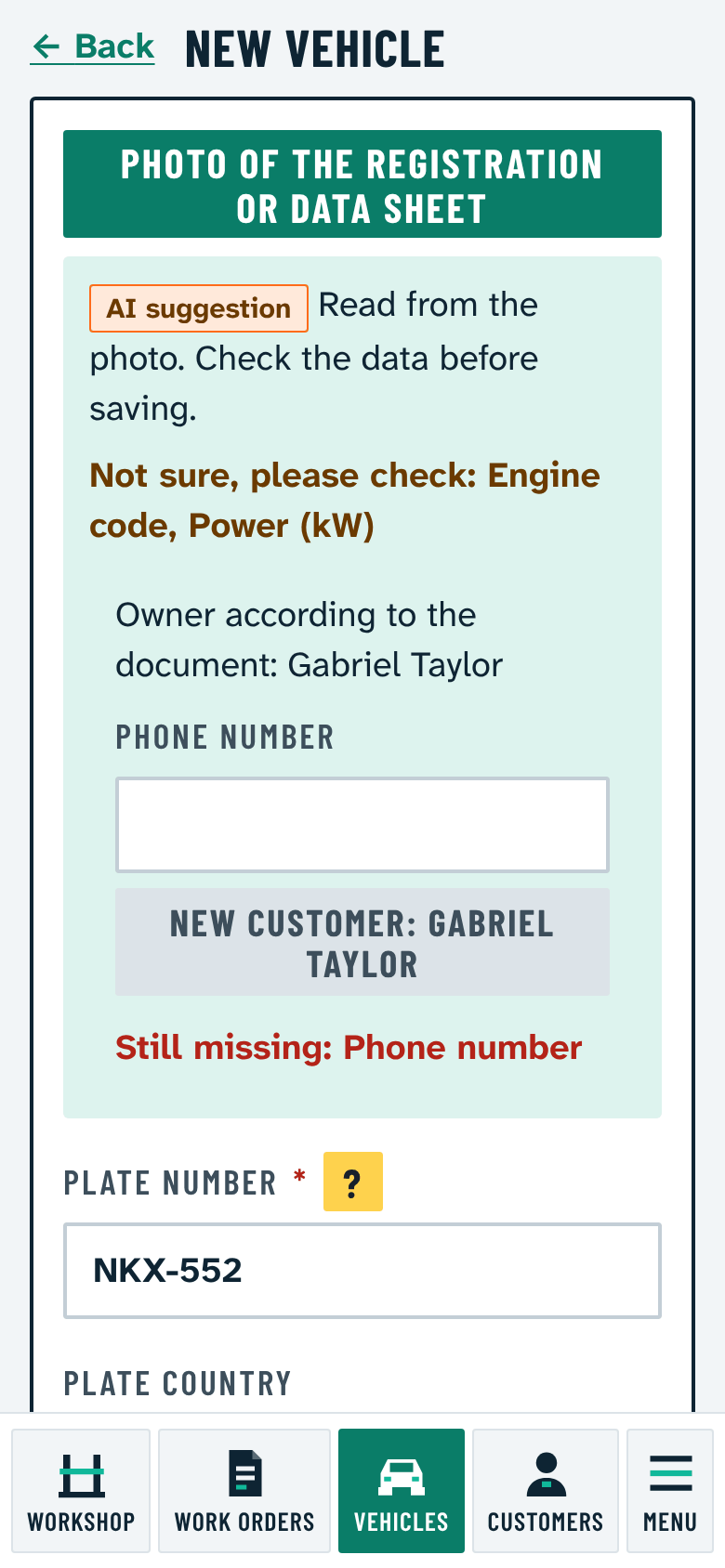
Take a photo of the registration and the AI fills in the car and the owner. Anything uncertain is shown in orange before you save.

About the registration photo
  • Take a photo of the registration certificate or another data sheet; the AI fills in the plate, VIN, model, power, displacement and the rest.
  • What it cannot read for sure is listed in orange, so you check it before saving.
  • If the photo cannot be read, it says so. It does not guess.
  • It offers the owner from the document: an existing customer with one button, a new one after entering the phone number.
Clear workshop work

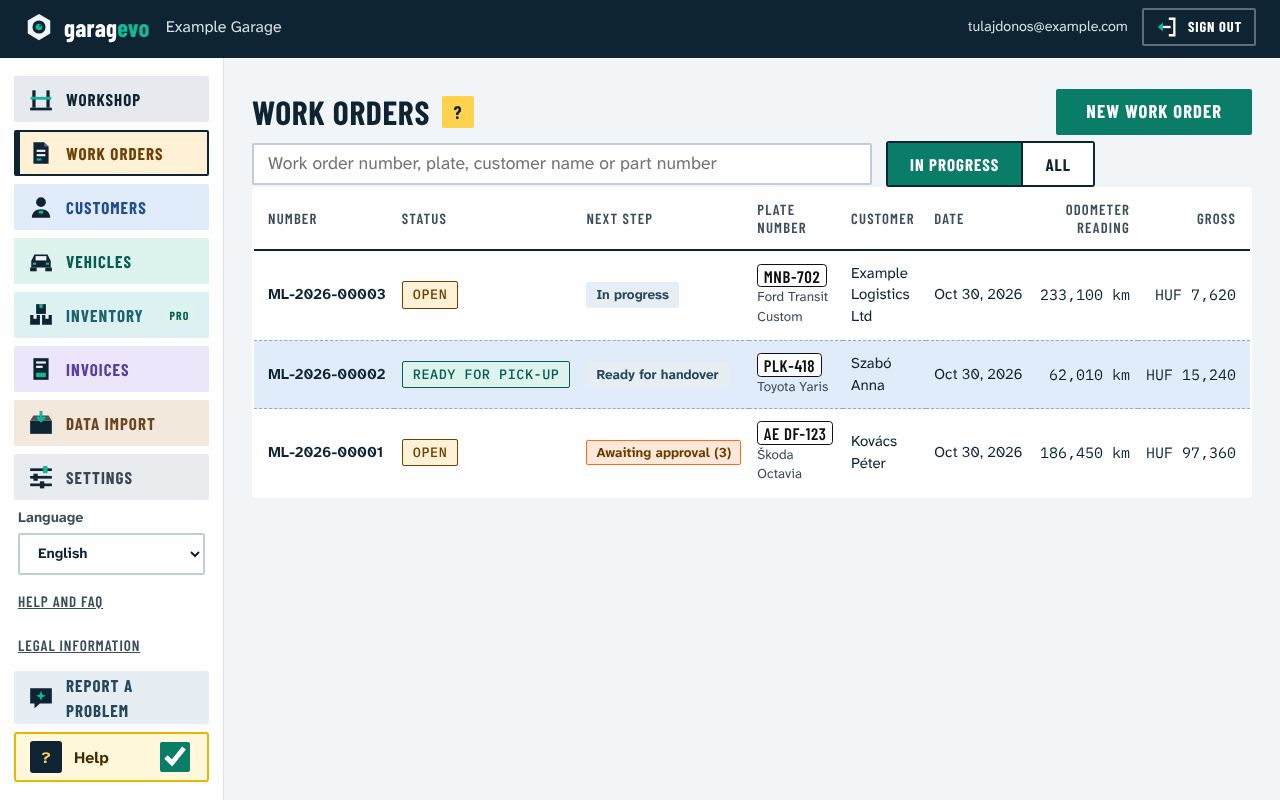
The work order list shows in colour what each job waits for. The customer approves the quote on the phone, line by line.

Quote, approval, closing
  • One button makes a link you send by Viber, WhatsApp, SMS or e-mail.
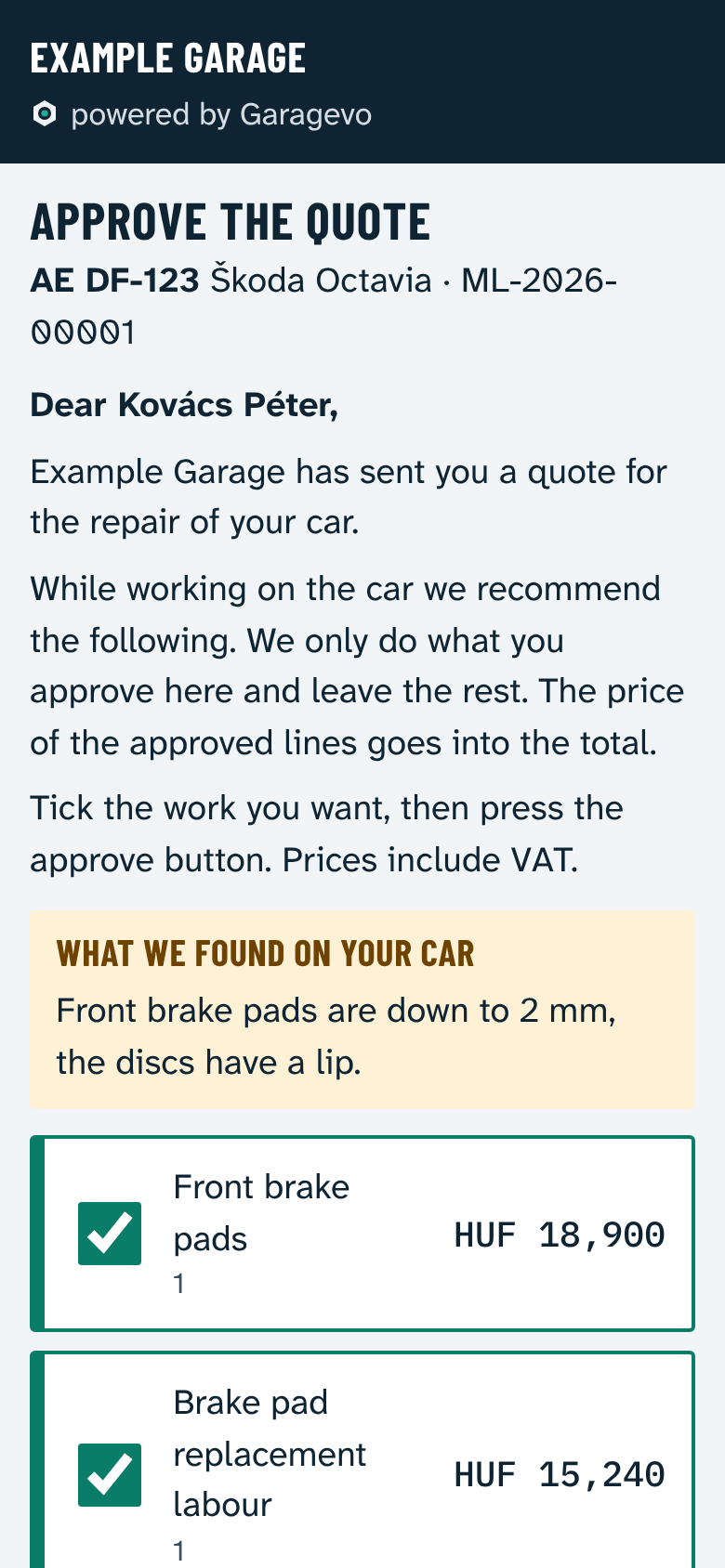
  • Without signing in, the customer sees on the phone what the mechanic found and ticks what they want, line by line.
  • When they answer, a notice appears in the program: work can start. An answer by phone is recorded with one button.
  • While a line waits for approval the work order cannot be closed, so nothing slips through by mistake.
  • Close: only a closed work order, no invoice. Close with invoice: payment method, then an invoice in the workshop's own Számlázz.hu account, e-mailed to the customer.
  • An invoice can be issued later for a work order closed without one. For bank transfers, The transfer arrived marks the payment.
  • In the work order list the Next step column shows in colour what each job waits for: approval, handover, transfer. Orange is urgent.

Data checked by mechanics AI

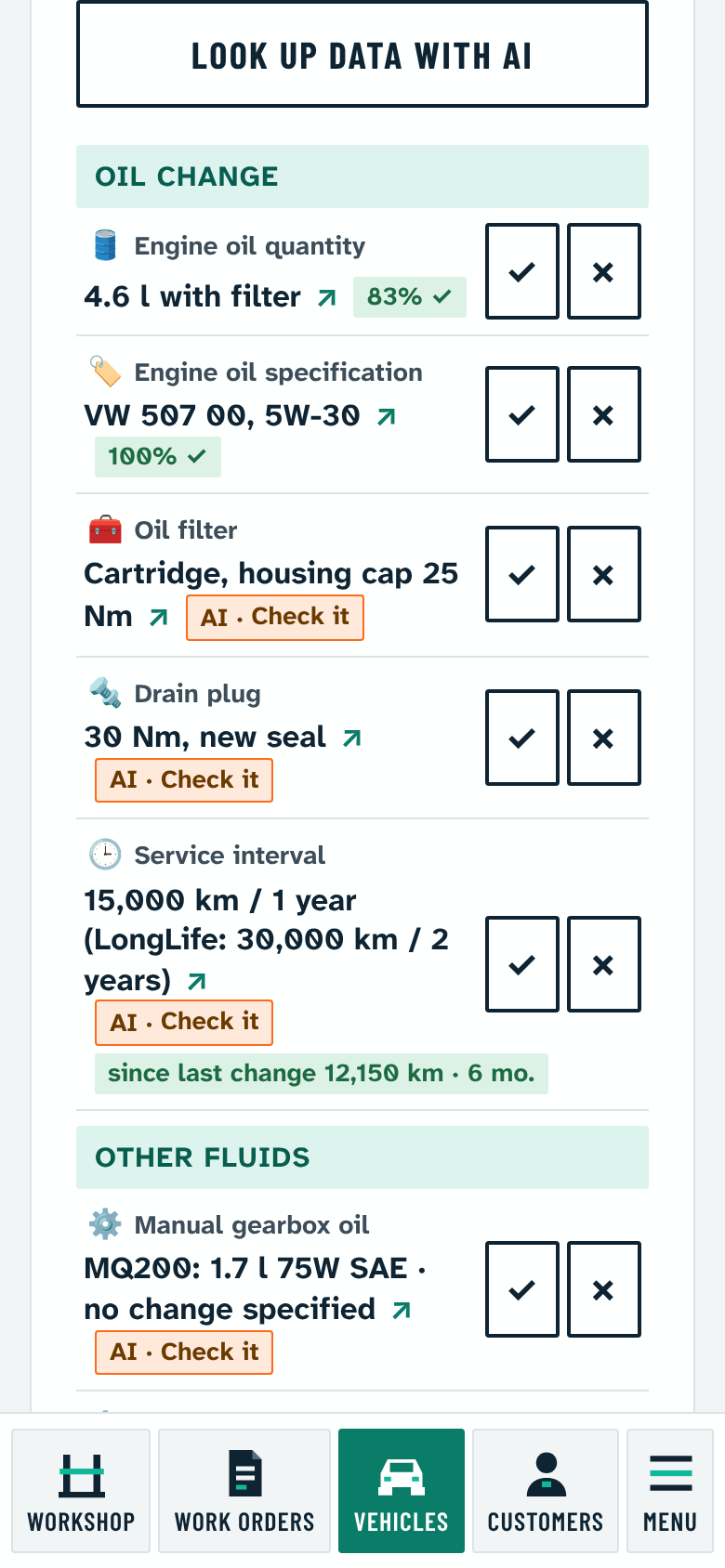
Oil quantity, torques, typical faults from the shared type data sheet. Every value shows its source and whether mechanics confirmed it.

About the type data sheet
  • Fill quantities, intervals, tightening torques, typical faults and mechanics' tips, grouped by type.
  • Every value shows its source. Values found by the AI are marked "Check it" until mechanics confirm them.
  • Correct or Not correct: one vote per mechanic. Confirmed values turn green and show the share of mechanics who confirmed them.
  • Important values (oil quantity and specification, service interval, wheel bolt torque) need at least 3 confirmations from at least 2 workshops. Values rejected several times disappear.
  • The data sheet is shared by every workshop but holds only type data, never customer data, and shows only for your own vehicles.
Example: how a value gains confidenceExample
Example: how a value gains confidenceIllustration with invented votes, not real data. The percentage is the share of confirmations among all votes. Check it Confirmed 3 confirmations, 2 workshops 0%50%100% 1. vote: Correct · 100% · Check it1.2. vote: Correct · 100% · Check it2.3. vote: Not correct · 67% · Check it3.4. vote: Correct · 75% · Confirmed4.5. vote: Correct · 80% · Confirmed5.6. vote: Correct · 83% · Confirmed6. 67%83% vote

Correct Not correct

Illustration with invented votes, not real data. The percentage is the share of confirmations among all votes.

The chart's data as a table
VoteVotedConfirmationsShareState
1.Correct1100%Check it
2.Correct2100%Check it
3.Not correct267%Check it
4.Correct375%Confirmed
5.Correct480%Confirmed
6.Correct583%Confirmed

A car's way through Garagevo

From intake to invoice in five steps. Where the AI helps, we mark it. The pictures are real screens with invented example data.

  1. 01

    Intake from a photo AI

    The AI fills in the car and the owner from a photo of the registration.

  2. 02

    AI data sheet AI

    Oil quantity, torques, typical faults from the shared type data sheet.

  3. 03

    Quote

    A link by Viber, SMS or e-mail, with the findings.

  4. 04

    Approval

    The customer ticks what they want, line by line. You see it at once.

  5. 05

    Close and invoice

    Without an invoice, or with a Számlázz.hu invoice, in one go.

A photo instead of typing
Data read from a registration photo. Real screen, invented example data.
AI data sheet
Type data sheet on the phone.
Approval
The customer's approval page.
Close and invoice
Work orders with the Next step column.
Also included

Built for the phone

Large type, thumb sized buttons, a bottom menu. Photos and dictation even with oily hands.

11 languages

Hungarian, English, German, Slovak, Czech, Polish, Romanian, Croatian, Slovenian, Serbian and Ukrainian.

Compliant work order

Printable work order and receipt with the mandatory texts and the warranty card.

Stock that does not block

Goods receipt, stocktake, bulk oil by the litre. Stock only warns, it never stops the work.

Your data is yours

Download every record in one ZIP (CSV and JSON) with one button, as a backup or to move.

Hosted in the EU

Data stays in the European Union, and every workshop sees only its own.

We are looking for our first partner workshops

Garagevo is just starting, so we have no references to show here yet. We are looking for workshops that use it in their daily work and tell us what helps and what is missing.

  • Report a problem or an idea with one button in the program, and see the answer in the same place.
  • The shared type data sheet gets more accurate with every mechanic's confirmation.
  • The first 20 workshops get the founder offer, see the packages.

Apply as a partner workshop

Packages and prices

Net monthly prices, with the gross price including 27% Hungarian VAT. Billed monthly; the subscription can be cancelled at any time, access lasts until the end of the paid period.

Basic

For a one person workshop

10,000 Ft + VAT / month

gross 12,700 Ft / month

2 users

75 smart lookup credits a month

Credits included in the package for smart lookups (Ask the AI), not the subscription fee

  • Work orders, customers, vehicles, printing
  • Closing with or without an invoice
  • Vehicle filled in from the registration photo
  • Shared type data sheet: fluids, maintenance plan
  • Download all data
  • Custom adjustments by individual offer

Premium

For larger services

34,900 Ft + VAT / month

gross 44,323 Ft / month

10 users

735 smart lookup credits a month

Credits included in the package for smart lookups (Ask the AI), not the subscription fee

  • Everything in Pro
  • The most user seats
  • The most monthly credits
  • 4 smaller custom adjustments a year, with priority (at most 4 hours of work each)

On top of the package

  • Extra user: 2,000 Ft + VAT (gross 2,540 Ft) / person / month, above the users in the package.
  • Paying yearly: 2 months free.
  • SMS: 25 Ft + VAT each sent by Garagevo, or free from the workshop's own Android phone.
  • Billed monthly; the subscription can be cancelled at any time, access lasts until the end of the paid period.
What is free and what is paid within the package?

Free in every package

  • Everything on the shared data sheet that someone has already looked up
  • The basic fill of the type data sheet (fluids, maintenance plan)
  • Reading the registration photo, and dictation
  • Company data from the tax number
  • SMS from the workshop's own Android phone
How do credits work?

Monthly credits in the package

A simple question costs 7, a longer answer (fuse box, timing) 14 credits. The monthly credits are used first and expire at the end of the month. Settings always shows how much is left.

What is there is free

Reading the shared data sheet, and anything another workshop has already asked, is free. The registration photo and dictation cost no credits up to a monthly number. Voting on the data earns credits.

A credit pack when needed

When they run out, the owner or a manager buys credits. Each purchase gets its own invoice; purchased credits do not expire.

Details in the help →

Every extra option is a switch, off by default, and the package decides what can be switched on. You can change package any time.

Custom needs

Garagevo is fully flexible: if your workshop needs something the program does not do yet, we adapt it.

Custom integrations

Parts wholesalers, invoicing, accounting software or the workshop's own system: we connect it to Garagevo.

Your own look

The workshop's logo on work orders, quotes and customer e-mails. The logo can already be set in the program.

Custom print forms, fields, exports

Your own work order layout, extra fields, a custom export or a simple CSV link, the way it suits you.

By individual offer, at a good price, with a deadline agreed in advance.

The Pro package includes 2, Premium 4 smaller custom adjustments a year (at most 4 hours of work each; Premium with priority). A smaller adjustment is for example your own work order layout, an extra field, a custom export or a simple CSV link. An adjustment is built as a setting or a switchable module of your workshop, not as a separate program.

The program grows with your suggestions: if an idea helps every workshop, we may build it in as a general function, and we charge no separate fee for it. What goes in, when and into which package is our decision (Terms clause 6.3).

I have a custom need

How the trial works

  1. 01

    First week: Pro

    For the first 7 days every Pro feature works for free, no card needed: quotes as a link, stock keeping, reminders.

  2. 02

    Day 8 to day 30: Basic

    You keep working for free with Basic (with the founder offer until day 60). The Pro features pause meanwhile, but your data stays and comes back at once when you choose Pro.

  3. 03

    Choose a package

    You do not have to subscribe to Pro: if Basic is enough for you, choose the Basic package and all your data stays. Basic stays free until day 30; Pro starts on the day you choose it.

  4. 04

    If you do not choose

    At the end of the trial the account becomes read-only: your data stays for 90 more days, visible and downloadable, but new work can be recorded only after choosing a package. We warn you twice by e-mail before deletion; choose a package by then and you carry on with all your data.

Frequent questions

Is it only for small workshops?

No. From one person shops to multi bay services: Basic includes 2 users, Pro 5, Premium 10, and extra users can be added to any of them.

Do I have to subscribe to Pro after the trial week?

No. If Basic is enough for you, choose the Basic package at the end of the 30 days and keep working with it; all your data stays. The stock, quotes and reminders recorded in the trial week stay stored too, and come back if you choose Pro later.

Do I need to install anything?

No. Garagevo runs in the browser, on the phone and the computer. The data is in the European Union, and every workshop sees only its own.

Can I use it without invoicing software?

Yes. A work order can be closed without an invoice. If you issue one, it is made with the workshop's own Számlázz.hu account.

What is a credit?

Credits included in the package for smart lookups (Ask the AI): checked technical data for your own car, with its source. They start again every month and are not money. The number of credits a lookup costs shows before you tap.

Can I take my data with me?

Yes. Every record can be downloaded in one ZIP (CSV and JSON) with one button, as a backup or to move.

Can I ask for custom development?

Yes. Custom integrations, your own look, print forms, fields or exports by individual offer, at a good price, with a deadline agreed in advance. Pro includes 2, Premium 4 smaller adjustments a year.

How does Garagevo's technical data lookup differ from a general AI chatbot?

Garagevo provides a technical data lookup designed specifically for the workflows of car repair workshops. It shows the sources available, displays the technical data in a uniform format, and lets mechanics confirm the data. Data collected by AI must be checked before use.

How do I cancel?

The subscription can be cancelled at any time in the program or by e-mail; access lasts until the end of the paid period, and a month already started is not refunded. With a yearly fee you can ask for it to end at the end of the month of cancellation; the fee of the full unused months is then refunded (Terms clause 10.1).

All frequent questions in the help →

Book a 15 minute demo

We briefly show how the work would go with Garagevo and answer your questions.

Phone number or e-mail address: at least one is needed.
Workshop size (optional)

For example: when we can reach you, what interests you most.